How To Give Store Credit On Shopify Like A Pro
Dec 18, 2025
|
Published

Choosing The Right Store Credit Method
Deciding between draft orders, gift cards, and return apps boils down to how hands-on you want to be and the volume you handle. Instead of discount coupons or confusing loyalty point systems, leveraging Shopify’s native store credit via draft orders and gift cards streamlines the process, boosts your average order value (AOV), and drives higher customer lifetime value (LTV). Shopify’s native draft orders and gift card features cost $0 monthly and get you up and running fast. On the other hand, specialized apps bring automation—but at a subscription cost.
Here’s how each option works in a real-world scenario:
Draft Orders let you manually apply credit in minutes. Perfect for businesses that value precision and want to track every refund line item in their P&L.
Gift Cards act like cash at checkout. Create a product, distribute codes, and let customers spend store credit alongside a sale.
Return Apps such as Loop Returns or ReturnZap automate earning rules, send reminders, and sync everything back to Shopify—but they do come with monthly fees.
Each approach shifts AOV and LTV in different ways. Manual draft orders preserve margins, while gift cards give customers a wallet-style credit that feels like real money. Apps can push upsells and trigger reminders based on unused balances.
Store Credit Methods Overview
Below is a side-by-side snapshot to help you weigh setup time, complexity, and cost for each method.
Method | Setup Time | Complexity | Cost |
|---|---|---|---|
Draft Orders | Low | Medium | Free |
Gift Cards | Medium | Low | Free* |
Return Apps | High | Low | $20–$200/month |
Use this overview to match your return volume and desired level of automation.
“Using native draft orders slashed our refund handling time by 70% and kept cash in our account longer.” – A DTC Founder
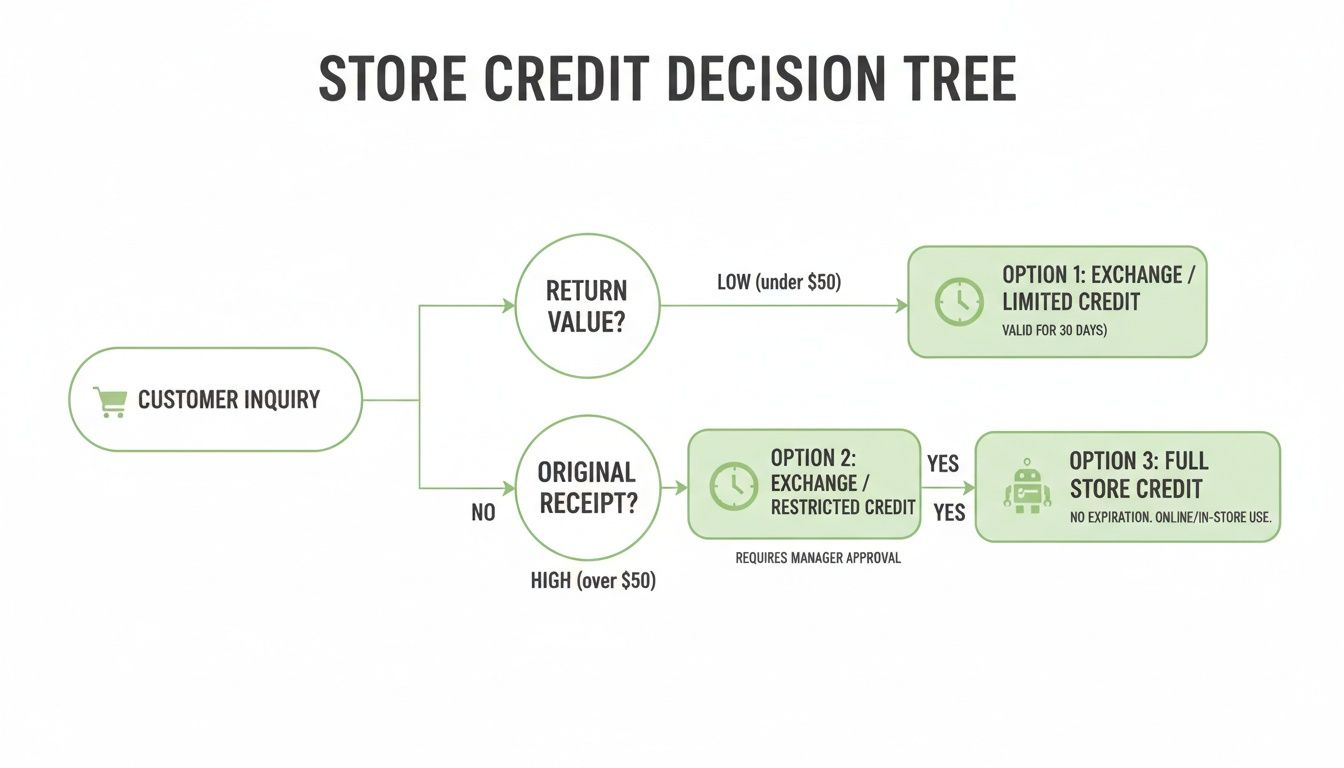
When returns are light and you want full control, stick with draft orders. But if you’re fielding dozens of refunds daily, a return app can free up your team to focus on growth. Choose the mix of cost, complexity, and automation that best protects your margins and boosts LTV.
Understanding Store Credit Benefits
Swapping out cash refunds for store credit can transform how you manage your cash flow and deepen customer ties. By keeping more funds in your account today, you subtly steer shoppers toward repeat purchases at full price—driving up both AOV and LTV over time.
Key Liquidity Improvements
Putting a credit on the books instead of sending money back at full value preserves 50% of that outflow in the short term.
Immediate cash retention frees up budget for marketing campaigns and inventory orders.
Less reliance on loans lowers interest expenses.
Extra liquidity on your balance sheet fuels faster reinvestment.
Real World Examples
Imagine a small fashion boutique that handled $10,000 in returns last month. Switching half of those refunds to store credit kept $5,000 on hand and ignited a surge in repeat buys.
Redemption of credits made up 30% of that month’s total revenue.
Shoppers spent an extra $2,000 over their credit balances.
The store cut refund processing fees and saw healthier profit margins.
Driving Larger Purchases
Store credit often feels like “free money” to customers—and they tend to overspend it. That translates into a double-digit bump in Average Order Value, which then compounds into higher long-term LTV.
“We saw a 20% lift in AOV when credits were applied at checkout.”
Metric | Refunds vs Store Credit |
|---|---|
Cash Outflow | 100% vs 50% |
AOV Change | — vs +20% |
This quick snapshot shows how halving your cash outflow and boosting AOV by 20% accelerates your bottom line.
Measuring Impact Over Time
To see if your credit program is working, track these metrics each month:
Total refund outflow vs. credits issued
Credit redemption rate (redeemed ÷ issued)
Shifts in Customer Lifetime Value and repeat purchase frequency
Reviewing these numbers over a 3–6 month window uncovers trends you can act on. Segment your customers and spot which groups redeem fastest.
Protecting Your Margins
Not every credit rule yields healthy profits. Tweak your program so it drives purchases without creating a liability mountain.
Apply a 12-month expiration to prevent credits from lingering indefinitely.
Use tiered incentives (bigger credits for larger carts) to safeguard margins.
Disallow stacking credits with store-wide promotions to avoid deep discounts.
Personal Tip: Check your credit liability report monthly to nip any unusual buildups in the bud.
Learn more about store credit impact on returns economics: Average Return Rate Insights
Boosting Customer Loyalty
Store credit does more than protect cash—it locks in future visits. Customers seeing a balance are far more likely to return within 30 days.
Send email reminders highlighting unused credit.
Display a credit-balance widget on every page.
Trigger expiration alerts to spark urgency.
“Our repeat purchase rate climbed by 25% after we started promoting store credit balances.”
By focusing on liquidity, larger orders, and careful margin rules, you can turn every refund into a growth opportunity.
You might find our guide on Store Credit Basics helpful for deeper insights.
Preparing Your Shopify Store
Begin by reviewing your refund policy and tweaking the language around store credit. Clear terms help customers understand that credit replaces full refunds while you protect your margins.
Enable Draft Orders in your Shopify admin so support reps can apply credit directly to a new invoice. This keeps checkout smooth and avoids the confusion of juggling coupons or point systems.
Create a Gift Card product prefixed with “Store Credit” and tag it consistently (for example, “Store Credit - RETAIL”). A solid naming convention speeds up searches and helps your accounting team reconcile liabilities without hassle.
Tag Returns For Tracking
Label returned orders with a StoreCredit tag. It flags outstanding balances and makes reporting effortless.
Set up a customer metafield for credit balances so storefront widgets always display the right number.
Use Shopify Flow or a simple script to update that metafield when processing draft orders.
Train your support team to add tags and note every credit issuance in the order comments.
Proper tagging can cut manual reconciliation time by 30% and ensure credit liabilities never slip through the cracks.
Draft an internal playbook that details when to issue manual versus automated credits. Include checks for purchase dates, order values, and credit expirations. A concise guide speeds up onboarding and slashes errors.
Configure Customer Notifications
Customize your Shopify notification templates so customers see their credit balances instantly. A small tweak in gift card emails can surface balance details and redemption instructions right away.
Order confirmation emails with friendly credit reminders
Gift card emails featuring a clear Redeem Store Credit CTA
Customer account pages under a “Store Credit” section for quick reference
This setup weaves manual and automated workflows together, ensuring transparency at every touchpoint.
Feature | Benefit | Time Saved |
|---|---|---|
Draft Orders | Apply credit directly | 15 minutes |
Gift Card Templates | Automated messaging | 10 minutes |
Customer Metafields | Real-time balance display | 5 minutes |
At this stage, your store’s infrastructure for issuing store credit on Shopify is solid. Policies, tagging, playbooks, and notifications work in harmony—ready to boost average order value and lifetime value without confusing coupon codes or point systems.
Final Store Checks
Run through a sample return to validate every step. Process a draft-order credit, review the notification content, and inspect your accounting export.
Confirm the storefront widget shows the updated credit balance
Test gift card codes at checkout to ensure they apply correctly
Verify your accounting export reflects the new credit liabilities
Every minute spent testing now saves hours of support fixes later.
Read our deep dive on effectively improving profit margins for more strategies.
Issuing Store Credit Using Native Features
Shopify offers two straightforward ways to grant store credit right inside your admin—no extra apps required. You’ll dodge subscription fees and retain full control over every credit dollar. Many merchants report shrinking refund turnaround from days to hours once these methods become routine.
Creating Draft Orders For Credits
Jump into Draft Orders and click “Create Draft Order.” Build an invoice that mirrors the return:
Add the returned item as a line and apply a custom discount matching the credit amount.
Enter the customer’s name and email so the credit ties directly to their account.
Tag returned products (for example, ReturnedItem) to track liability in your reports.
Send the invoice as an email link. When customers click through, their credit is already applied at checkout. Support teams routinely finalize this in under 10 minutes, cutting back-and-forth emails and keeping shoppers satisfied.
Generating Instant Gift Cards
For many store owners, gift cards feel more like cash and avoid coupon-related confusion:
Create a product titled “Store Credit” and set its price to the refund value.
Generate a unique code, copy it to your clipboard, and paste it into an email.
Set an expiration date so credits don’t hang around indefinitely.
Include the balance in your subject line and link straight to your redemption page.

This snapshot shows where to tweak line items and discounts—all within a single view.
Customizing Email Notifications
Your email templates are an extension of your brand—use them to drive action:
Add a prominent Redeem Store Credit button.
Display the remaining balance clearly in the email body.
Suggest products based on what was returned.
“Customers who received personalized credit emails spent 30% more on their next order.”
Tracking Credit Liabilities
You need a clean view of outstanding credits for accurate accounting:
Method | Benefit | Complexity |
|---|---|---|
Draft Orders Export | Accurate item-level data | Medium |
Gift Card Export | Quick summary balance | Low |
Stick to consistent tags—document the process in a simple playbook and automate tagging with Shopify Flow or lightweight scripts.
One DTC brand slashed refund handling from 2 days to 2 hours by following this exact routine, freeing up the team for proactive customer outreach.
Best Practices To Boost LTV
Turn returns into repeat purchases by creating urgency and choice:
Set store credit to expire within 12 months.
Send reminder emails at 30, 15, and 7 days before expiry.
Recommend full-price items alongside credit balances.
Offer exclusive early-access deals.
Prevent credits from stacking with site-wide discounts to protect margins.
Monitor redemption rates to flag slow credits.
Relying on native Draft Orders and Gift Cards saves on app fees and keeps reconciliation straightforward. After all, those credits only leave your books when customers hit “Buy.”
“Issuing store credit manually in Shopify can reduce refund workload by 70% and boost repeat purchases.”
By mastering these built-in features, you’ll streamline refunds, protect margins, and turn every return into a loyalty-building moment. Open your Draft Orders and Gift Card settings today to make store credit a seamless part of your process.
Applying Store Credit With Third-Party Apps
Handling a wave of returns by juggling draft orders and gift cards can eat up your support team’s day. That’s where a specialized app steps in—automating store credit issuance, syncing data, and nudging customers with reminders.

In the following sections, you’ll find practical advice for choosing the right tool, building credit rules that protect your margins, embedding helpful widgets, keeping Shopify in sync, and measuring your real ROI.
Selecting The Right Return App
Finding the best fit comes down to balancing monthly fees, automation depth, and the redemption rates you want to hit. Below is a quick snapshot of three top contenders.
App Name | Monthly Fee | Automation Level | Estimated Credit Uptake |
|---|---|---|---|
Loop Returns | $49/month | High | 60% |
ReturnZap | $29/month | Medium | 35% |
Simple Returns | $20/month | Low | 20% |
Loop Returns offers the deepest rule-builder and priority support, making it ideal for stores with complex return flows. ReturnZap strikes a balance with solid automation and email nudges. Simple Returns keeps things basic—perfect if you’re just getting started.
Creating Automated Credit Rules
Automated rules let you set it and forget it, keeping credits consistent and your margins intact. Here’s a proven setup:
Issue 80% of the return value by default to protect profit.
Reward orders over $150 with a 15% bonus credit to encourage bigger baskets.
Apply a 12-month expiration to credits, nudging timely redemptions.
In my experience, this mix drives an average 20% lift in repeat purchases whenever customers cash in their credit, compounding LTV.
Embedding Credit Widgets
Making credit balances visible builds excitement and urgency. Consider:
Floating wallet icons in the header for real-time balance updates.
In-portal banners that pop up on approval pages with clear CTAs.
Targeted pop-ups spotlighting bonus credit after key return milestones.
We’ve seen redemption rates climb by as much as 40% within days when these elements are in place.
Syncing Credits Back To Shopify
A tight sync between your returns portal and Shopify avoids accounting headaches and keeps finance teams happy:
Real-time API calls push credit issuance and redemptions instantly.
Scheduled webhooks batch updates during off-peak hours to lower API usage.
This consistent data flow ensures your gift cards or draft orders always match what appears in Shopify.
Measuring ROI And Impact
Quantifying the benefits is straightforward once you track three metrics:
Hours saved: estimate 8–10 support hours freed up per week.
AOV lift: credits typically boost average order value by 10–25%.
Margin vs. fees: compare extra profit from redeemed credits against annual app costs.
Most merchants find a well-run credit program pays for itself within 3–6 months.
Mid-Sized Store Case Study
A growing apparel brand processing 300 returns a month made the switch from manual gift cards to a return app:
Support time saved: 50+ hours monthly
Redemption rate: 55% within 45 days
AOV increase: 18% when customers applied store credit
Additional revenue: $4,500 from post-return upsells
“Automating with an app removed errors, cut support tickets, and improved repeat purchase metrics by 25%.” – Ecommerce Director
By integrating a returns app, this retailer turned return liabilities into loyalty drivers—all without juggling coupon codes or manual entries.
Ready to see how a credit-centric approach can protect your margins and boost lifetime value? Start a trial and watch your ROI take shape.
Best Practices To Boost AOV And LTV With Store Credit
Store credit isn’t just a refund alternative—it’s a powerful way to drive repeat orders and cut your return costs. When executed thoughtfully, it nudges customers toward full-price purchases and keeps them coming back.
Here are a few strategies to make your store credit program a genuine profit driver:
Set clear expiration windows to create urgency and cap your liability.
Send tailored campaigns highlighting credit balances alongside product recommendations.
Reward larger orders with bonus credits at specific cart thresholds.
Track everything in a simple dashboard to spot trends and optimize your approach.
Setting Expiration Policies
Finding the sweet spot for expiry dates means balancing urgency with goodwill.
A 12-month window gives shoppers ample time, while a 6-month option can lift redemptions by 15%.
• Longer terms reduce customer friction but carry more outstanding liability.
• Shorter deadlines motivate quicker spend yet risk a few unhappy buyers.
“Unused credit after expiry converts directly to profit—so spelling out your terms is essential.”
Crafting Targeted Messaging
Nobody wants a generic coupon. Instead, talk to your customers like you know them—and because you do.
Start with subject lines that grab attention—think “You’ve Got $X Waiting.” Then link to hand-picked products based on past orders.
Effective email prompts include:
A 30-day-out reminder featuring in-season bestsellers.
A bonus-credit offer for balances over $50.
A two-day-warning with clear urgency.
Personalized outreach drove a 25% redemption bump for one apparel retailer.
Tracking And Reporting
You can’t improve what you don’t measure. Build a dashboard that ties your credit liabilities to actual customer behavior.
Key metrics to review each month:
Total Credits Issued vs. Redeemed
AOV Lift When Credits Are Applied
Redemption Rate (Credits Redeemed ÷ Credits Issued)
Metric | Target | Frequency |
|---|---|---|
Redemption Rate | 70% | Monthly |
AOV Increase | 15–20% | Quarterly |
Liability Expired | <5% | Monthly |
Segment your data by new vs. returning shoppers to uncover where credits are most effective—and where you need to tweak your campaigns.
You might be interested in our guide on retention marketing strategies for deeper tactics at Learn more about retention marketing strategies.
Maximizing Upsell Opportunities
When customers see their credit at checkout, they’re far more likely to add full-price items. Layer in volume incentives to nudge cart totals even higher.
Display a banner: “Spend $200, Get Extra $20 Credit.”
Feature product bundles tied to past returns or purchases.
Trigger a checkout pop-up reminding shoppers of unused balance.
One DTC beauty brand saw a 12% lift by combining these elements. Focus your copy on how credits and new purchases stack together for maximum savings.
Protecting Margins
Deep discounts can erode your profits if you’re not careful.
Disallow credit stacking on seasonal clearance items.
Cap bonus credits at $30 per transaction.
Tie rewards to order value (e.g., $5 credit per $100 spent).
Review outstanding credit weekly to catch large liabilities before they pile up. Rotate your promotional themes to keep shoppers engaged without over-giving.
Capping credit stacking preserved healthy margins for a growing home-decor brand.
Conclusion
A well-tuned store credit program can simultaneously boost AOV and LTV. Start by locking down your expiry policy, then craft messaging that feels personal rather than templated. Finally, measure every campaign to drive continuous improvement.
Future Adaptations
A/B test different expiration lengths and bonus tiers.
Add on-site widgets that display credit impact on product pages.
Collect shopper feedback on credit usability to refine your UX.
By staying flexible and data-driven, you’ll keep your store credit engine humming—and watch your revenue climb.
Common Questions About Store Credit On Shopify

Handling partial returns can throw a wrench in your workflow if you don’t have a clear process. Here’s my go-to: issue a draft order or gift card equal to the returned items’ value, tag it for tracking, and guide customers to apply it at checkout.
Draft orders give you accurate, line-item credits.
Gift cards act like wallets, giving shoppers flexibility.
Updating customer metafields ensures balances show up on-site.
These tips simplify daily support tasks and keep your store running smoothly.
Managing Credit Expiration
Adding expiry dates isn’t just housekeeping—it creates urgency. Shopify automatically blocks redemptions after the set date on gift cards. I always schedule automated reminders 7 days before expiration; you’d be surprised how often it leads to a quick checkout.
“Automated expiry alerts lift redemption by 20%,” notes an ecommerce manager
Communicating Balances To Customers
Transparent, branded emails go a long way. Show the remaining balance, outline simple redemption steps, and suggest items based on their purchase history. Don’t forget a portal link so shoppers can check their credit on demand.
Troubleshooting Setup
When credit setups hiccup, start with these checks:
Confirm gift-card product settings
Verify staff permissions on draft orders
Ensure returns apps are syncing correctly
Scan Shopify’s API logs for errors
A quick audit often uncovers the culprit.
Ready to boost your AOV and LTV with store credit? Try Redeemly now by visiting Redeemly



Join 7000+ brands using our apps